
Imagine you’re sitting in a taxi, stuck in traffic, and you remember something you need to do on your computer back home. You pull out your phone, type a quick message to Claude, and by the time you walk through the door — it’s done. The files are organized, the spreadsheet is updated, the report is ready.
That’s exactly what Claude Cowork Dispatch promises. Anthropic just announced this feature, and if it works the way they describe it, it could change how we all work with AI.
Let me break down what Claude Cowork Dispatch is, how it will work, and why I think this could be a game changer.
What is Claude Cowork
Claude Cowork is a new way to work with Claude where you maintain a persistent conversation that doesn’t reset between sessions. Unlike regular chats where every session starts from zero, Cowork keeps a continuous thread. Claude remembers what you told it yesterday, last week, all the context — like a real assistant who works with you every day.
It’s not a new chat every time. It’s a continuous working relationship. If you asked Claude to review a document yesterday and today you want to modify it, Claude Cowork already knows which document you’re talking about.
This is different from what we do with OpenClaw or autonomous agents. Claude Cowork isn’t an agent that works alone — it’s an assistant that works with you, in real time, keeping context across sessions.
What is Dispatch in Claude Cowork
Claude Cowork Dispatch is the feature that will let you assign tasks from any device — your phone, a tablet, another computer — and have Claude execute them on your desktop where Claude Desktop is running.
In simple terms: you type a task on your phone, and Claude executes it on your PC. No remote desktop apps, no VPNs, no complicated setup. Just you, your phone, and Claude doing the work on your machine while you’re somewhere else.
If you’ve read my article about the differences between OpenClaw, ChatGPT and Claude, you know Claude excels at following complex instructions. Claude Cowork Dispatch takes that to the next level — now those instructions come from your pocket.
How Claude Cowork Dispatch Will Work Step by Step
Based on Anthropic’s documentation, here’s how the flow of Claude Cowork Dispatch will work:
- Your desktop stays on with Claude Desktop running and Cowork enabled
- You open Claude on your phone — iOS or Android
- You write your task: “Organize the downloads folder by file type”
- Claude Cowork Dispatch sends it to your desktop
- Claude executes the task using your files, tools, and connectors
- You get the result back on your phone
Everything happens in one persistent thread. If you want to modify something, just message Claude again — it already has the full context. No re-explaining.
What You’ll Need to Use Claude Cowork Dispatch
According to Anthropic’s announcement, you’ll need:
- Claude Desktop — latest version for macOS or Windows (x64)
- Claude mobile app — latest version on iOS or Android
- Pro or Max plan — Claude Cowork Dispatch won’t be available on the free tier
- Internet connection on both devices
- Computer must stay awake — if it goes to sleep, Dispatch can’t execute tasks
That last point is important. If you close your laptop and leave, Claude can’t do anything. It needs the app active. It’s like having an employee in the office — if the office is locked, they can’t get in to work.
How to Set Up Claude Cowork Dispatch
The setup process looks straightforward:
- Update Claude Desktop to the latest version
- Update Claude on your phone
- Open Cowork on either device
- Click “Dispatch” in the left panel
- Select “Get started”
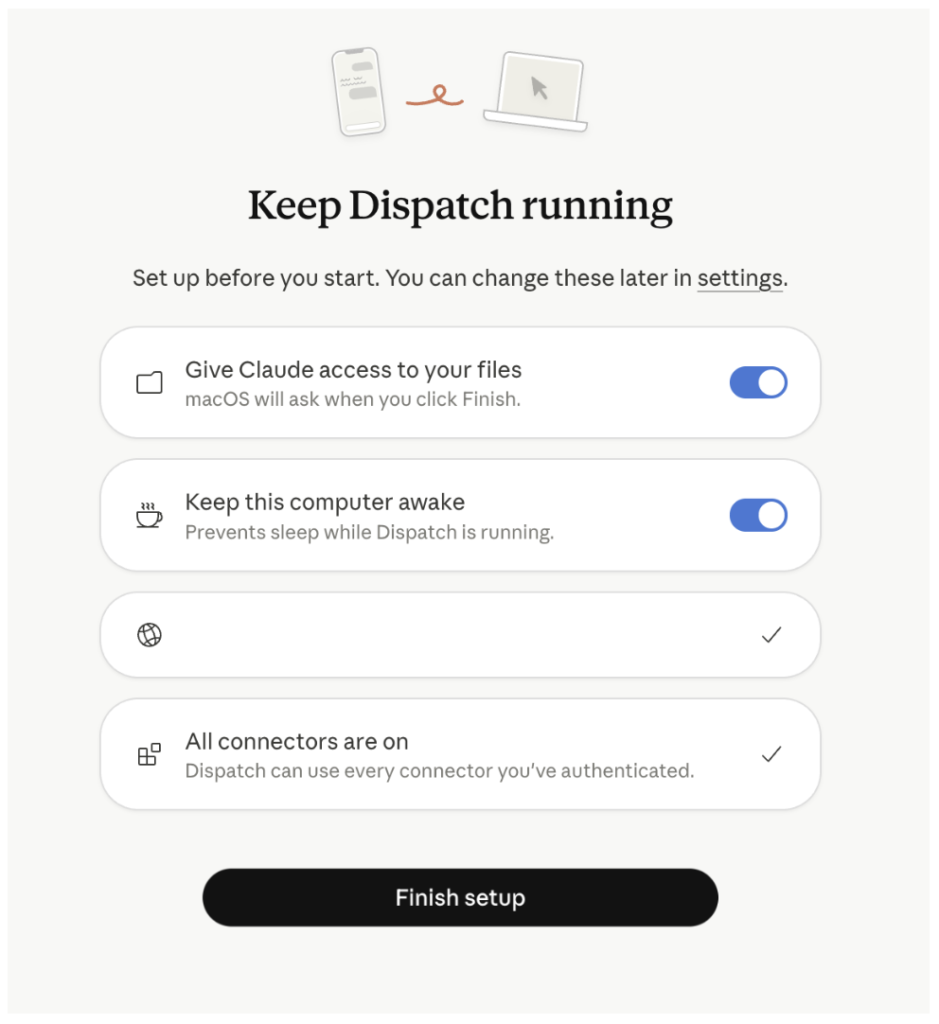
- Toggle file access and keep-computer-awake options
- Click “Finish setup”
- Start sending tasks from the Dispatch section
Five minutes and you’re ready. Faster than installing OpenClaw on a VPS, that’s for sure.
Use Cases That Make Claude Cowork Dispatch Exciting
Here’s what I’m most excited to try when Claude Cowork Dispatch becomes available:
From a taxi: get a Slack summary
Imagine being on your way to a meeting and dispatching: “Read the last 50 messages in the Slack export on my desktop and summarize the action items.” You walk into the meeting fully briefed, without having touched your computer.
From bed at 7am: check the numbers
Before even getting out of bed, dispatch: “Open the Q1 spreadsheet in Downloads, check if monthly totals match the annual summary, and flag any discrepancies.” Coffee first, then look at the results on your phone.
From the airport: update a presentation
Waiting for a flight and you realize the client deck needs updating. Dispatch: “Update the client presentation with the latest numbers from the March CSV. Replace slides 4 and 7.” When you land, it’s done. Claude Cowork Dispatch handled it while you were in the air.
Organizing files remotely
This might be the simplest but most satisfying use case. Dispatch: “Organize all files in Downloads into subfolders by type — PDFs, images, spreadsheets, code. Delete anything older than 90 days.” No clicking through folders. Just clean organization done remotely.
Claude Cowork Dispatch vs Virtual Assistants
How does Claude Cowork Dispatch compare to hiring a virtual assistant or using other AI tools?
- A human VA costs $400-800/month, has working hours, and needs everything explained. Claude Pro costs $20/month and never forgets context.
- ChatGPT can’t access your local files or execute tasks on your computer. Claude Cowork Dispatch can.
- OpenClaw is perfect for autonomous agents on WhatsApp, but Claude Cowork is for personal productivity. They’re complementary.
- Siri and Google Assistant can’t handle complex tasks. “Summarize this Excel file” is beyond them.
Limitations of Claude Cowork Dispatch to Watch For
Based on what Anthropic has shared, there are some limitations to keep in mind:
- Desktop must stay on. If it sleeps or shuts down, Claude Cowork Dispatch can’t execute anything.
- No completion notifications yet. You’ll need to check the app to see if the task is done — no push notifications for now.
- Single conversation thread. You can’t run multiple Dispatch threads at once.
- Not proactive. Claude Cowork Dispatch only works when you assign something. It won’t tell you “hey, you have an urgent email.”
- Scheduled tasks handled separately. You can’t say “every Monday at 9am do this” through Dispatch directly.
Security in Claude Cowork Dispatch
This matters. When you activate Claude Cowork Dispatch, you’re giving Claude access to your computer from your phone. Any instruction you send from your phone can trigger actions on your desktop — open files, move folders, access connected services.
Anthropic recommends that you:
- Trust all apps and services connected to Claude Desktop
- Understand which files and accounts are accessible through Dispatch
- Only enable what you actually need
- Think about potential capabilities, not just intended uses
If you’re interested in AI agent security, read my guide on OpenClaw security — similar principles apply: least privilege, auditing, and common sense.
My Honest Take on Claude Cowork Dispatch
I work from Dubai. I’m constantly moving between cafes, taxis, airports. The biggest friction in my workflow has always been that I need to be in front of my computer for things to happen. Claude Cowork Dispatch could eliminate that friction entirely.
Think about it. Every time you think “I’ll do that when I get home” — that’s a task that could be dispatched. Every time you write a note to yourself — that’s a Dispatch message. The gap between “I should do this” and “it’s done” could shrink to zero.
Is it going to be perfect? Probably not at launch. The lack of notifications will be frustrating. The requirement to keep your computer on limits it for laptop-only users. But the concept is right, and if Anthropic executes it well, Claude Cowork Dispatch could be the most useful AI productivity feature of 2026.
I’ll be testing it the moment it’s available and will update this article with real results.
How to Get Ready for Claude Cowork Dispatch
- Make sure you have Claude Desktop installed and updated
- Install the Claude mobile app on your phone
- Get a Pro or Max plan if you don’t have one
- Keep an eye on Anthropic’s announcements for the launch date
- Start thinking about which tasks you’d delegate first
And if you want an agent that already works autonomously 24/7 without waiting for Dispatch to launch, check out what OpenClaw is — that’s a different beast entirely.
See you in the next one.